Thursday, 28 January 2016

EMAIL MARKETING CONCERNS YOU NEED TO CONSIDER

Concerned why your email marketing efforts are going in vain?

You might be overlooking these aspects that are needed to consider when marketing your product through email:

Know your customers
Absolutely all businesses know their target customers but when using email marketing, one thing to keep in mind is who your customers are- probably the most responsive ones, before rushing in to ‘Send All’ button. Various email tracking tools are available that read customer behavior like email open, spam box, link clicks and unsubscribe so you know whom to send emails the very next time.


Screwed subject lines

Have you ever wondered why your emails are non-responsive?
Perhaps, one big reason behind this could be the ‘subject line’ you’re using. People usually scroll through their inbox to find something of their interest instead of opening every single email. A perfectly crafted subject line will definitely compel the reader to take action.
Informal is interactive

Emails starting with more informal salutations like Heya, Hi etc. are found to be more interactive than those dry ones that follow strict formal obligations.

Personalization has power
Marketers are focusing more on mass customization-offering products/services to masses that are individually personalized, same rule follows for email marketers too. Dig-out more customer information by doing thorough research to get your messages personalized for every unique customer.

Outdated database
Another matter of concern is to keep track of your contact databases. If you’re constantly sending emails to employee who has already left position, it would surely go in vain. Use lead generation tools that will keep you updated with outdated information and keep recommending changes that are need to be considered.

Do not overdo
If you are thinking frequent emails will help market r product/service effectively, you’re possibly wrong! Abusing your customer’s email IDs will land you in spam folder or eventually get you unsubscribed and you’ll never be able to reach their inbox again. Using email IDs adequately and sending emails that contain information of customer’s interest to get the job done effectively.

To learn more tips on web marketing. Visit https://www.glu7.com/blog/

Tuesday, 26 January 2016

4 TECHNIQUES TO ESCALATE YOUR PINTEREST PROMINENCE

Are you a new marketer on Pinterest and looking for a big market to share your content and increase visibility? Do you want to enhance your boards’ and pins’ audience?

Here are four handy tricks that you can learn and increase your customer reach.

1. Know Your Pinterest customers: It is obvious people from all around the globe having diverse backgrounds use social networking today, but on a deeper level, different people uses different social media platforms for different purpose. So, before heading to create a pin or board you need to know whom your posts might be reaching to.

    Here are some interesting Pinterest facts:
  • Around 100 million people use Pinterest daily creating nearly 50 billion pins with 60% users from US
  • 80% of Pinterest users are women generating 90% pins on average
  • 13% of active adult males uses with on average 120% of growth rate recorder in 2015
  • A chunk of 67% users falls under age bracket of 40 years
Marketing your product is a lot easier if you hold a business account where you can get an insight of your customers based on their demographics easily using Pinterest Analytics where you can control whom you’re connected to and who can see your pins. You can do this by simply selecting Demographics tab under Audience in Analytics tab.

2. Mold content according to your customer preference: Knowing your audience’s interest is more likely to help in understanding and molding content according to your customers’ preferences. You can find out your customers’ mutual interest by accessing interest menu under audience tab to find out common labels your customers share.

3. Create approachable descriptions for searches: However most users will look for selected feeds according to their interest. They will more likely use Pinterest search to find pins they’re looking. Adding relevant and clear keyword tags strategically in your pins and boards will increase possibility that your content will be viewed.

For instance, you’re uploading content related to cars/automobiles; make sure to be specific and clear like “10 most favorite vintage cars”.

4. Install Widgets: You can grow your Pinterest following and audience by simply installing some useful widgets and buttons so that users can pin your content easily. You can do this by installing:

Pin it button: An effective way to enable users re-pin your content by simply clicking pin it button.

Follow button: If you want your pins to appear in feeds of your customers/audience, keep them updated and encourage audience to follow you, install Follow button so they can keep coming to you. It can serve as a pull marketing technique that will aid developing your audience’s interest by highlighting your latest pins on Pin board in thumbnail view. It will enhance audience engagement where you can direct them directly to your pins instead of waiting them to approach. Make sure to pretest all the installed buttons yourself first to ensure they are working well. For more tips on how to enhance the impact of social media, visit glu7 blog.

Thursday, 21 January 2016

20 Little but Important Things about Web Designing – Part 2

20 Little but Important Things about Web Designing – Part 2

Okay, so in the last installment of this post, I stressed on a few points that may appear as trivial, but they are in fact, very important in terms of designing. Here is a recap.

1. Saving time and effort by taking inspirations form others,
2. Optimizing line height,
3. Not sticking to a single font,
4. Optimizing column width, and
5. Using color science to optimize colors.

Here are more of those little but important things that matter in web designing.

6. Adding lines to make design uncomplicated

Adding lines can be tremendously helpful if you have a design that focuses more on text. Adding a line can help you with the fonts and give a positive feel about the whole design.

7. Priorities, priorities

Coming up with a hierarchy always makes things easier. Know what matters the most, the headline, the logo or anything else. When you know which element is the most important in your design, it becomes easier to set it apart from the rest of the elements.

8. Smart reuse of elements

UX has to stand out from the rest, but it doesn’t have to lose its touch with consistency in doing so. Smartly reusing the same fonts, colors and elements keeps things consistent and reduces the amount of work. Use it to your advantage.

9. White space doesn’t hurt

Majority of beginning designers feel empty white space is always something bad and try to fill that space up with unnecessary elements. More white space doesn’t hurt; but unnecessary content does.

10. Grouping Related Elements

It pays well to group similar elements together and it also happens to be one of the better practices in the world of web designing.

There are many website builders like glu7 and squarespace that allows you to design a desirable website for your  business. So this was the continued part of our previous post, for the next Part 3 visit us next week.

Friday, 15 January 2016

20 Little but Important Things about Web Designing – Part 1


Are you scratching your head because you are confused between hiring a pro web designer and doing it yourself? Or have you done it yourself already and are now thinking if it really gives out that professional look?

Wherever you are, just relax and read-out these points. Understanding that all the points can be too much to stomach at once, I have decided to break it into 4 parts. This is the first part.

The following are some of the little things that will give your DIY site the finishing look a pro designer gives.

1. Steal like an Artist

Even Steve Jobs acknowledged there is no shame in copying! What matters is that you should be able to blend the inspirations optimally. Referring to professional designs lets you focus more on details that matter to your website, saving your time and effort to rebuild everything from scratch.

2. Optimize line height

Optimally, line is kept at 1.6 so if things aren’t consistent in your design block, just select the font in pixels – which is 1.0 by default – and multiply it by 1.6.

3. Don’t stick to a single font

Use a set of 2 different fonts that work well together if you’re a beginner. It creates a contrasting flavor to your design.

4. Optimize your column width

Column’s width should be based on the nature of site and the page. 55-60 characters are optimum.

5. Coloring your website

There is a whole science behind colors and how they effect a design, and you can read out this post from the blog of glu7: freewebsite builder, but if you’re confused, just go with black and white.


There you go. 5 essential elements to give you head start in designing your own webpage. More is on the way. Be sure to visit this blog the next week.

Monday, 23 November 2015

Useful DIY On-page and Off-page Hacks to Improve Your Landing Page


The first rule in augmenting the efficiency of conversion path is to improve the quality of your landing page. It seems like a simple task but optimization of that one page actually requires lots of thinking and planning. 


Fear not; to optimize this lander there are two major areas where you will have to focus: on-page (the design) and off-page (the promotion).

If you are here looking for on-page and off-page hacks that will help you enhance the productivity of your landing page, read on.


On-page Factors


· Keep the design neat and free from clutter.

· Use the text, images, buttons and videos in best manner.

· Urge the users to interact and take action.

· Keep your landing page precise.

· Optimize your internal linking.

Here’s another hack for on-page if have no clue how to start with the steps listed above. Use a free website making tool like Wix, Weebly, GLU7 or Square Space and pick one from their given templates. This will ease your efforts and also give you a head start.


Off-Page Factors


· Apply the science of search engine optimization to garner more views and increase organic traffic.

· Make use of email marketing to contact subscribers and readers.

· Utilizing tools of search engine marketing

· Initiating pay-per-click campaigns for more visibility

· Using social media like Pinterest, Facebook, Twitter and Google+ to reach out to millions of social network users.


A successful conversion will require excellent use of both on-page and off-page optimization techniques. So it's crucial you don't rely on just one factor. 

Monday, 16 November 2015

How to optimize inbound marketing online?


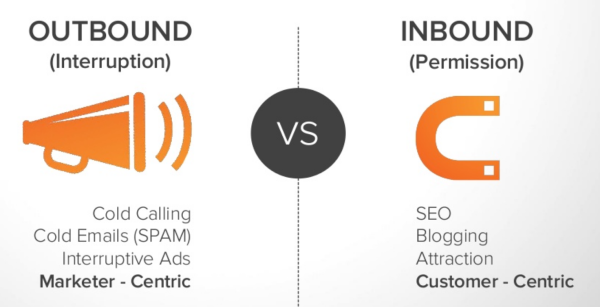
Inbound marketing means welcoming customers to your premises, instead of going out and aggressively targeting them. It is an essential part in marketing mix and thus should never be underrated, let alone ignored.

Inbound marketing works better for incoming customers because it gives them a true taste of your brand. They’re eager to know and that is why you should always s be ready for their arrival and armed in the best manner to entertain their queries.


Here are some tricks to optimize your website and thus your inbound marketing.

Take notes and put them to use

Take notes of customers. Note the path(s) which brings them to your site. Once you’ve noted, optimize that path with content that attracts, helps, solves their problems and delivers value.

Integrate a Blog

The safest bet. Visitors who have found their way to our blog are probably there because they have been looking for something and now feel that your site may have it. Every single one of those happy visitor will remember your page and will refer others facing the same problem should a situation arise.

So be sure to keep the blog updated with new and engaging content that attracts, holds, engages and captures the loyalty of your customer.

Optimizing and Simplifying Visitor's Path

Optimize every page in the conversion path. Landing page, order confirmation and thank-you pages are some that can be optimized for a better conversion rate.

Improving Load Speed

Customers tend to get furious when they see loading pages. They want a smooth and quick experience. And why not, they have better things to do. So keep your loading speed optimum. Consult with your IT team if you have to, to make pages faster without having to cut-down on valuable content.


Incorporating Share Buttons

Satisfied customers become brand evangelists. They can’t wait to share their experience with others. So making them wait is going to be a big letdown. 


This unnecessary inconvenience can be easily avoided by just integrating the sharing buttons on the pages of your website. Buttons like facebook, Twitter, Pinterest and Google Plus allows user to spread the word with just a couple of clicks. It also lets you in on potential leads. 

With a website builder like Square Space or GLU7, these elements can be easily integrated, but even if you are using custom content management system, be sure to add these elements in your website to heighten your number of visits and your conversions.


Wednesday, 4 November 2015

How to Optimize Images Using Alt-Text

Pictures speak volumes.  Although pictures shouldn’t come at the cost of textual content, the statement merely means that the power of pictorial content cannot be underestimated. From brand logos to long-scrolling detailed infographics, everything depicts the power visual content.

Powerful and meaningful as these pictures may be, there is one serious issue when it comes to them. And that issue is the inability of search engines to read them. While Google and Bing have becomes smart enough to read the text and offer data to the user according to the text, they still haven’t been able to read and analyze pictures.

This is where alternative-text, otherwise known as alt-text and alt-tag comes in.


Alt-Text

Basically, alt-text too is a text-based piece of content that signals search engines what the image in question is about. It allows search engine crawlers and bots to see what they otherwise cannot. As one can expect, alt-text is the soul of the image when it comes to image optimization. The more accurate the text, the more preference it gets from search engines because it helps them offer relevant content to the users.

How to Optimize Images?

Keeping the content as relevant as possible in alt-text is crucial, but it is also rewarding. Great visual content, backed up by the right alt-text can rank websites on top of search engines. Here are some tips on how you too, can optimize your image and your website via alt-text.

  • Keep it relevant
  • Keep it short
  • Keep it natural
  • Avoid spam and stuffing
  • Keep the focus on important aspects of the image
Whether you manually add images to your site or use a website builder, be sure to add alt-text every time.