Showing posts with label internet. Show all posts

Thursday, 18 February 2016

How to Gauge The Effectiveness of Infographics as a Great Marketing Tool?


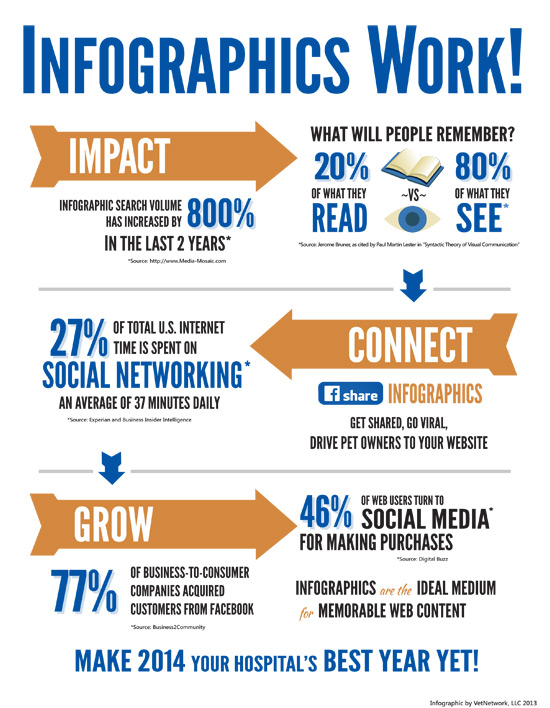
Infographics provide a visual representation of accumulated data and information in an easy and understandable form for readers. It is a fact that human eye perceives a visual much faster than normal text. Appealingly designed infographics draw instant attention of readers. The word ‘infographic’ has been basically derived from ‘information’ and graphics’ which means the combination of these two is favorable for engaging huge amount of audience in reading the visual content.

The popularity of infographic content is ever increasing as in just 2 years, its search volume has increased by 800 percent.

Here are some of the authentic reasons that truly measure the core significance of infographics as a remarkable marketing tool:
  • Captivating for readers
  • Instantly perceived by human eyes
  • Ability to get viral
  • Social media friendliness
  • Powerful content marketing strategy

Captivating for readers

It is one of the prime reasons for infographics to captivate the attention of readers. This visual representation has a power to engage huge amount of audience by its impressive appeal. From a marketing perspective, it is also good to use infographic as it helps increase more conversion.

Instantly perceived by human eyes

Human eyes have a tendency to perceive and understand visual content than simple plain text content. Visual content influences the human brain much faster than normal words. It is a fact that visually appealing information is easily understood and remembered as compared to non-visual information for readers.

Ability to get viral

Infographics are able to get viral by their eye catching data representation for readers. It creates more traffic and conversion.

Social media friendliness

Infographics are extremely social media friendly with quick content virality. The visual data is well-researched and gives enormous information in an entertaining format.

Powerful content marketing strategy

Infographic is a powerful content marketing strategy as it helps promote content to readers in informal and appealing way. It also helps increase huge traffic and conversion optimization. This strategy is always beneficial to boost informative content to readers.

Infographics make up only piece of this marketing mix puzzle. There are various other elements in content marketing a digital marketing professional should know. Check out those other elements in these blogs

Thursday, 21 January 2016

20 Little but Important Things about Web Designing – Part 2

20 Little but Important Things about Web Designing – Part 2

Okay, so in the last installment of this post, I stressed on a few points that may appear as trivial, but they are in fact, very important in terms of designing. Here is a recap.

1. Saving time and effort by taking inspirations form others,
2. Optimizing line height,
3. Not sticking to a single font,
4. Optimizing column width, and
5. Using color science to optimize colors.

Here are more of those little but important things that matter in web designing.

6. Adding lines to make design uncomplicated

Adding lines can be tremendously helpful if you have a design that focuses more on text. Adding a line can help you with the fonts and give a positive feel about the whole design.

7. Priorities, priorities

Coming up with a hierarchy always makes things easier. Know what matters the most, the headline, the logo or anything else. When you know which element is the most important in your design, it becomes easier to set it apart from the rest of the elements.

8. Smart reuse of elements

UX has to stand out from the rest, but it doesn’t have to lose its touch with consistency in doing so. Smartly reusing the same fonts, colors and elements keeps things consistent and reduces the amount of work. Use it to your advantage.

9. White space doesn’t hurt

Majority of beginning designers feel empty white space is always something bad and try to fill that space up with unnecessary elements. More white space doesn’t hurt; but unnecessary content does.

10. Grouping Related Elements

It pays well to group similar elements together and it also happens to be one of the better practices in the world of web designing.

There are many website builders like glu7 and squarespace that allows you to design a desirable website for your  business. So this was the continued part of our previous post, for the next Part 3 visit us next week.

Monday, 23 November 2015

Useful DIY On-page and Off-page Hacks to Improve Your Landing Page


The first rule in augmenting the efficiency of conversion path is to improve the quality of your landing page. It seems like a simple task but optimization of that one page actually requires lots of thinking and planning. 


Fear not; to optimize this lander there are two major areas where you will have to focus: on-page (the design) and off-page (the promotion).

If you are here looking for on-page and off-page hacks that will help you enhance the productivity of your landing page, read on.


On-page Factors


· Keep the design neat and free from clutter.

· Use the text, images, buttons and videos in best manner.

· Urge the users to interact and take action.

· Keep your landing page precise.

· Optimize your internal linking.

Here’s another hack for on-page if have no clue how to start with the steps listed above. Use a free website making tool like Wix, Weebly, GLU7 or Square Space and pick one from their given templates. This will ease your efforts and also give you a head start.


Off-Page Factors


· Apply the science of search engine optimization to garner more views and increase organic traffic.

· Make use of email marketing to contact subscribers and readers.

· Utilizing tools of search engine marketing

· Initiating pay-per-click campaigns for more visibility

· Using social media like Pinterest, Facebook, Twitter and Google+ to reach out to millions of social network users.


A successful conversion will require excellent use of both on-page and off-page optimization techniques. So it's crucial you don't rely on just one factor. 

Wednesday, 4 November 2015

How to Optimize Images Using Alt-Text

Pictures speak volumes.  Although pictures shouldn’t come at the cost of textual content, the statement merely means that the power of pictorial content cannot be underestimated. From brand logos to long-scrolling detailed infographics, everything depicts the power visual content.

Powerful and meaningful as these pictures may be, there is one serious issue when it comes to them. And that issue is the inability of search engines to read them. While Google and Bing have becomes smart enough to read the text and offer data to the user according to the text, they still haven’t been able to read and analyze pictures.

This is where alternative-text, otherwise known as alt-text and alt-tag comes in.


Alt-Text

Basically, alt-text too is a text-based piece of content that signals search engines what the image in question is about. It allows search engine crawlers and bots to see what they otherwise cannot. As one can expect, alt-text is the soul of the image when it comes to image optimization. The more accurate the text, the more preference it gets from search engines because it helps them offer relevant content to the users.

How to Optimize Images?

Keeping the content as relevant as possible in alt-text is crucial, but it is also rewarding. Great visual content, backed up by the right alt-text can rank websites on top of search engines. Here are some tips on how you too, can optimize your image and your website via alt-text.

  • Keep it relevant
  • Keep it short
  • Keep it natural
  • Avoid spam and stuffing
  • Keep the focus on important aspects of the image
Whether you manually add images to your site or use a website builder, be sure to add alt-text every time.


Thursday, 8 October 2015

The Edge of using Free Website Creators in Small Businesses


Small businesses operate on limited capital so they just can’t afford to make mistakes. Most of the small businesses, due to their limitations rely on saving, which often revolves around seeking better alternatives.

If you don’t know about free website builders, let’s just say they are another great way to save money for your business. In fact, they can help you make more of it. How? Here are some perks of free website builders your business could use. 


Benefit of looks
A good-looking interfaces serves more purposes than one. It can help manage the content; it can make life easy for customers and it can improve your chances of gaining more customers.


Perks of increased traffic
Site creators feature a plethora of tools and elements which can integrated and optimized to make the site more appealing and more relevant to the visitor. The result is more traffic and better retention.


Edge of social media integration
With your social feeds linked to your website, customers can now easily get in touch with you. As for you, everything is now unified for you, making it easier to manage. Customer retention and engagement is easier to manage with free business website makers giving you social integration.


Compatibility with SEO
Being SEO-friendly is now a primary requirement for any site. Unless you are using one of these great free tools, it’s going to take more time, effort and capital to make the site SEO-friendly.


Advantage of Responsiveness
Mobile responsiveness go hand-in-hand with SEO. With April’s update, Google has made it clear that websites lacking support for mobile devices will not be given the consideration they were getting from Google. This makes mobile compatibility a must-have. Here is where website builders can come in handy as they offer responsive support for websites. Any site you will create on say, Glu7 or Wix, is going to be mobile-friendly out-of-the-box.


Wednesday, 30 September 2015

How to Create a Website from Start Using Glu7

This is the age of digital marketing. Everything is digital these days. Going digital in this age is an integral part of a successful firm’s marketing mix. However, the first step in going digital is getting a website, which requires a lot of time and attention.

The good news is that with website creators like Wix and Glu7, that’s not a problem anymore. Here is how you too, can create magnificent websites using Glu7 website creator without breaking a sweat.

Just sign up

Signing up is easy and only takes a couple of clicks. Enter your name and email ID and get registered. Once you are registered, log in and you will be taken to the dashboard where you will have two options: create the site from blank page or pick a theme to save the trouble.


Domain and pages

To create a new page just click on ‘add page’ on the left side of the screen. Now, name the page accordingly. You should not forget to name your domain as well. to change the name using Glu7 website builder, simply click on the cog icon besides the pages's name.

Using the dashboard

Using the interface is as easy as dragging and dropping. Pretty much everything you need can be found within the menu bar located at the top of your screen. Just pick the right item and drag it down to integrate it with your page. Headers, footers, apps, sample content, everything can be added this way.

Changing the body and the content

Having great content to back your creativity in designing is absolutely critical. So either use the given templates to get an idea about the content or insert the content completely by yourself, it’s up to you. Just be sure to make it count.

Reviewing and publishing the site

Now check the site once more before you finalize the changes. Review your URL structure, layout, content and other areas of your website. Once you are sure about publishing it, click on save button on top-right corner. Now click on ‘publish now’ to publish the page.