Showing posts with label DIY. Show all posts

Monday, 16 November 2015

How to optimize inbound marketing online?


Inbound marketing means welcoming customers to your premises, instead of going out and aggressively targeting them. It is an essential part in marketing mix and thus should never be underrated, let alone ignored.

Inbound marketing works better for incoming customers because it gives them a true taste of your brand. They’re eager to know and that is why you should always s be ready for their arrival and armed in the best manner to entertain their queries.
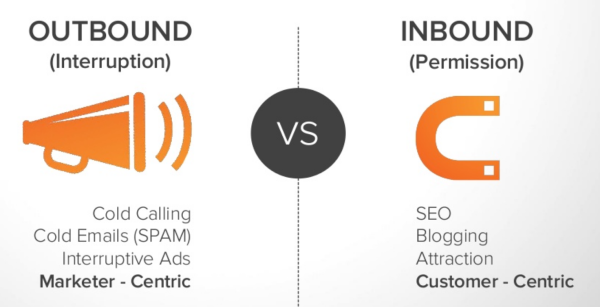


Here are some tricks to optimize your website and thus your inbound marketing.

Take notes and put them to use

Take notes of customers. Note the path(s) which brings them to your site. Once you’ve noted, optimize that path with content that attracts, helps, solves their problems and delivers value.

Integrate a Blog

The safest bet. Visitors who have found their way to our blog are probably there because they have been looking for something and now feel that your site may have it. Every single one of those happy visitor will remember your page and will refer others facing the same problem should a situation arise.

So be sure to keep the blog updated with new and engaging content that attracts, holds, engages and captures the loyalty of your customer.

Optimizing and Simplifying Visitor's Path

Optimize every page in the conversion path. Landing page, order confirmation and thank-you pages are some that can be optimized for a better conversion rate.

Improving Load Speed

Customers tend to get furious when they see loading pages. They want a smooth and quick experience. And why not, they have better things to do. So keep your loading speed optimum. Consult with your IT team if you have to, to make pages faster without having to cut-down on valuable content.


Incorporating Share Buttons

Satisfied customers become brand evangelists. They can’t wait to share their experience with others. So making them wait is going to be a big letdown. 


This unnecessary inconvenience can be easily avoided by just integrating the sharing buttons on the pages of your website. Buttons like facebook, Twitter, Pinterest and Google Plus allows user to spread the word with just a couple of clicks. It also lets you in on potential leads. 

With a website builder like Square Space or GLU7, these elements can be easily integrated, but even if you are using custom content management system, be sure to add these elements in your website to heighten your number of visits and your conversions.


Wednesday, 4 November 2015

How to Optimize Images Using Alt-Text

Pictures speak volumes.  Although pictures shouldn’t come at the cost of textual content, the statement merely means that the power of pictorial content cannot be underestimated. From brand logos to long-scrolling detailed infographics, everything depicts the power visual content.

Powerful and meaningful as these pictures may be, there is one serious issue when it comes to them. And that issue is the inability of search engines to read them. While Google and Bing have becomes smart enough to read the text and offer data to the user according to the text, they still haven’t been able to read and analyze pictures.

This is where alternative-text, otherwise known as alt-text and alt-tag comes in.


Alt-Text

Basically, alt-text too is a text-based piece of content that signals search engines what the image in question is about. It allows search engine crawlers and bots to see what they otherwise cannot. As one can expect, alt-text is the soul of the image when it comes to image optimization. The more accurate the text, the more preference it gets from search engines because it helps them offer relevant content to the users.

How to Optimize Images?

Keeping the content as relevant as possible in alt-text is crucial, but it is also rewarding. Great visual content, backed up by the right alt-text can rank websites on top of search engines. Here are some tips on how you too, can optimize your image and your website via alt-text.

  • Keep it relevant
  • Keep it short
  • Keep it natural
  • Avoid spam and stuffing
  • Keep the focus on important aspects of the image
Whether you manually add images to your site or use a website builder, be sure to add alt-text every time.


Friday, 2 October 2015

Learn How to Optimize Your Site for Mobile Phones and Tablets


Having one website that does it all is the essence of today’s digital marketing, SEO and SEM. A big population of the world surfs the internet through their mobile phones and tablets. This makes it even more vital to concurrently entertain users of different platforms.

So how can you reach out to those users without spending pretty pennies on programmers and developers?

The answer is simple – ‘a website creator’.

These website creators can be simple, easy and fun. But there are more reasons to try them out. Creators like GoDaddy, Wix and Glu7 also let you optimize your sites for smartphones as well as tablets.


While Wix lets you create sites on both platforms, there is one thing I found out that was better on Glu7 – it’s that the site you create on Glu7 does not need to be optimized separately for mobile platforms, i.e. it is automatically optimized for them.

Here is a short tutorial on how to create mobile-ready sites using Glu7.

Just sign in on Glu7.com, go to the dashboard and start creating your site. The interface runs on the idea of drag-and-drop so the learning curve isn’t that steep. You can edit the elements using the editors provided as well as remove objects with simple clicks.

Done creating? Good! Now onto the next step. Click on the tiny mobile icon on the top-left corner. This will change the preview of the site to mobile mode, allowing you to see how the site looks real-time in a smartphone. As you will see, the site will not need a major overhaul. Pretty much everything will already be set for a mobile surfer. You can also switch to tablet and laptop modes to see how the site looks for a tablet or a laptop user that lands on your site.


With everything in place, you are now ready to publish the website. First, click on the save button near the icons of the platforms. Now click on publish now button.

Congratulations! Your mobile-friendly site is now live.